
Academic Oversight: Designed in compliance with standard collegiate syllabus weighting rubrics and quality point accumulation standards endorsed by the American Association of Collegiate Registrars and Admissions Officers (AACRAO).
Navigating a college course syllabus requires mastering one fundamental mathematical skill: understanding how to calculate weighted grades. Unlike high school courses that frequently tally raw points, collegiate professors divide coursework into proportional percentage buckets—such as Exams (40%), Homework (25%), Quizzes (15%), and a Final Exam (20%). Under this system, earning a 95% on a homework assignment carries an entirely different mathematical impact on your cumulative grade than earning a 75% on a heavily weighted midterm examination.
Learning how to calculate weighted grades empowers you to accurately assess your current class standing, identify exactly where your semester efforts must be concentrated, and avoid misleading learning management system (LMS) calculations. Learning platforms like Canvas or Blackboard often display artificially inflated running averages by omitting unsubmitted assignments. Understanding the mathematical formula behind weighted grading ensures you never experience unexpected final grade drops.
How to calculate weighted grades in college: Multiply your percentage score in each category by its syllabus weight percentage (expressed as a decimal), and sum the results: Final Weighted Grade = ∑ (Category Percentage Score × Category Weight Decimal). For example, if Exams are worth 40% (0.40) and you hold an 85%, that category contributes 34.0 percentage points (85 × 0.40) directly toward your 100-point course total. During the semester when only part of the course is graded, divide by the sum of completed weights.
📖 Table of Contents (Click to Expand) [Show/Hide]
- 1. Total Points vs. Weighted Grades: Key Structural Differences
- 2. The Master Weighted Grade Formula Explained
- 3. Step-by-Step Worked Syllabus Example (Biology 101)
- 4. How to Calculate Your Running Midterm Grade (Incomplete Weights)
- 5. The “Drop Lowest Score” Adjustment Formula
- 6. How Extra Credit Interacts with Weighted Percentages
- 7. How to Calculate What You Need on the Final Exam
- 8. Frequently Asked Questions (FAQ)
1. Total Points vs. Weighted Grades: Key Structural Differences
Before executing formulas, students must identify which grading model their course syllabus utilizes:
A. Unweighted Total Points System: In an unweighted course, every single point carries identical mathematical weight regardless of assignment type. If a homework assignment is worth 100 points and a midterm exam is worth 100 points, both have identical impact on your final average. Your grade is calculated by simply dividing total points earned by total points possible.
B. Category-Weighted System: In a weighted course, the professor assigns a fixed percentage value to distinct categories, and assignments within that category compete only for internal percentage shares. For instance, a 10-point quiz in a category worth 10% has minimal overall impact, while a 100-point midterm in a category worth 35% can single-handedly alter your GPA by an entire letter grade. To examine exact drop formulas and damage simulations when missing high-weight assignments, consult our analysis on how much does a zero affect your grade.
2. The Master Weighted Grade Formula Explained
To master how to calculate weighted grades, you apply standard algebraic linear combinations. The universal equation for complete courses reads:
Final Grade = (g1 × w1) + (g2 × w2) + (g3 × w3) + … + (gn × wn)Where:
• gn represents your percentage score (0% to 100%) within each category.
• wn represents the proportional weight of that category expressed as a decimal (e.g., 25% = 0.25).
• The sum of all weights (w1 + w2 + … + wn) equals exactly 1.00 (or 100%).
3. Step-by-Step Worked Syllabus Example (Biology 101)
Consider a realistic university Biology 101 syllabus structured around four evaluation tiers. The following calculation table illustrates how to convert raw scores into final course percentages:
| Assessment Category | Category Weight (%) | Weight (Decimal) | Your Average Score | Weighted Points Contributed |
|---|---|---|---|---|
| Homework & Problem Sets | 20% | 0.20 | 92.0% | 18.40 Points (92 × 0.20) |
| Laboratory Reports | 25% | 0.25 | 88.0% | 22.00 Points (88 × 0.25) |
| Midterm Examination | 25% | 0.25 | 76.0% | 19.00 Points (76 × 0.25) |
| Final Cumulative Exam | 30% | 0.30 | 84.0% | 25.20 Points (84 × 0.30) |
| Total Course Record | 100% | 1.00 | — | 84.60% (Solid B Grade) |
By executing the category breakdown, the student finishes with an 84.60%. This course percentage translates into quality points on your transcript. To verify how this letter grade affects your cumulative degree standing, consult our College GPA Calculator.
4. How to Calculate Your Running Midterm Grade (Incomplete Weights)
One of the most frequent dilemmas students face is knowing how to calculate weighted grades halfway through the semester, before final exams or late-term assignments are submitted. When only a portion of the syllabus is graded, the completed weights do not add up to 100%.
If you simply sum your earned points without adjusting the denominator, your calculated grade will appear artificially depressed. You must execute the Running Weighted Average Equation:
Running Grade = (∑ Earned Weighted Points) / (∑ Completed Category Weights)Worked Running Grade Example: Suppose you have completed Homework (20% weight, 90% score) and Midterm 1 (25% weight, 80% score). The final exam (30%) and lab reports (25%) are not yet graded:
1. Earned Weighted Points = (90 × 0.20) + (80 × 0.25) = 18.0 + 20.0 = 38.0 Points
2. Total Completed Weight = 0.20 + 0.25 = 0.45 (or 45% of course)
3. Current True Running Grade = 38.0 / 0.45 = 84.44% (B)
This reveals that you currently hold an 84.44% average heading into the final stages of the semester, providing a realistic baseline for final exam planning.
5. The “Drop Lowest Score” Adjustment Formula
Many collegiate syllabi offer a student-friendly grace policy: “The lowest quiz score will be dropped from your grade calculation.” To correctly compute your average within that category:
1. Identify and Exclude: Eliminate the single lowest raw percentage score from your list of submissions.
2. Recalculate Internal Denominator: If you took 5 quizzes worth 20 points each (100 total points possible) and drop one, your category total points possible becomes 80 points (not 100).
3. Compute Category Percentage: Divide your sum of points on the remaining 4 quizzes by 80 points.
4. Apply Overall Category Weight: Multiply this adjusted internal percentage by the syllabus category weight.
6. How Extra Credit Interacts with Weighted Percentages
Students frequently misunderstand how extra credit operates within a weighted syllabus architecture. Professors implement extra credit in two fundamentally different ways:
Type 1: Points Added to a Specific Category: If extra credit points are awarded on a quiz or lab, they expand your category numerator without increasing the category denominator. For example, earning 5 bonus points in a Homework category increases your homework average, but its impact on your overall course grade is scaled down by the category’s weight (e.g., 5 points × 0.20 weight = 1.0% increase on your final class grade).
Type 2: Points Added to Final Course Grade: If a professor offers “2 percentage points on your final class standing” for attending guest lectures or completing evaluations, those points are added directly to your overall calculated percentage after all weighting is complete.
7. How to Calculate What You Need on the Final Exam
Once you understand how to calculate weighted grades, you can invert the formula to determine the exact score you need on your final exam to secure your target letter grade:
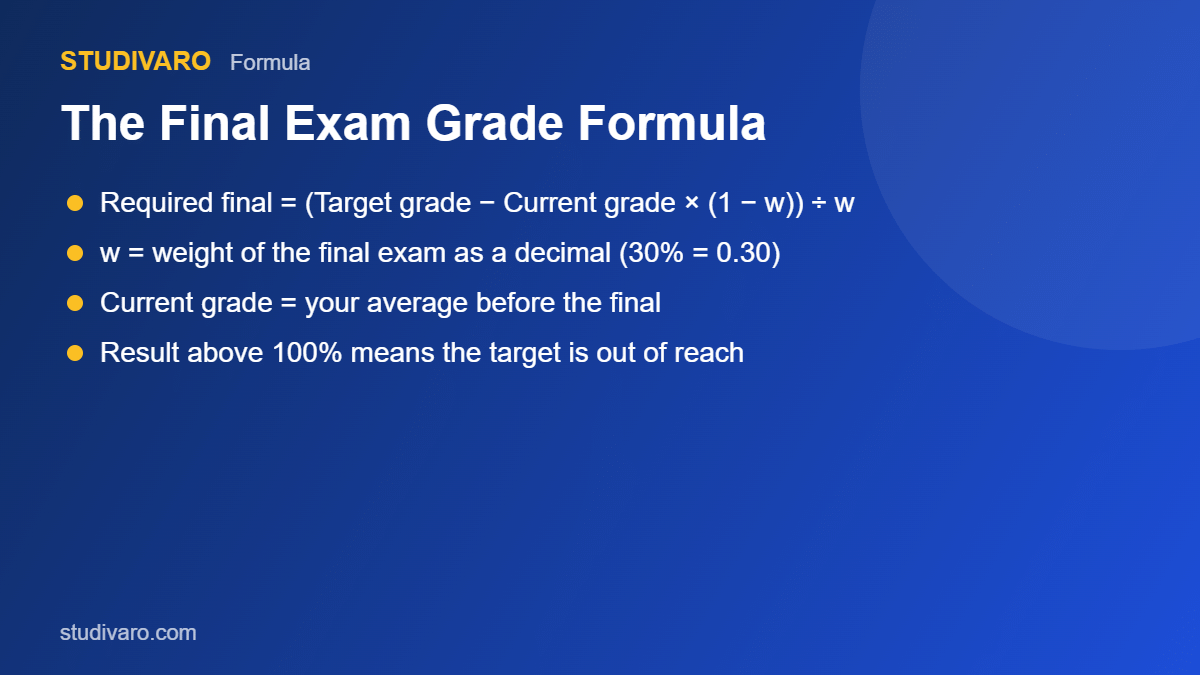
Required Final Exam Score = (Target Grade – (Current Pre-Final Grade × (1 – Final Weight))) / Final WeightFor example, if you hold an 82% pre-final average, your final exam is worth 30% (0.30), and your target grade is an 80% (B):
• Required Score = (80 – (82 × 0.70)) / 0.30 = (80 – 57.40) / 0.30 = 22.60 / 0.30 = 75.33%.
Instead of executing multi-step algebraic equations by hand during exam week, automate your calculations with our specialized Final Exam Grade Calculator, which models multi-category syllabi and custom letter grade thresholds.
8. Frequently Asked Questions (FAQ)
Why is a weighted grade different from a normal grade average?
A simple normal average treats every assignment equally by summing all earned scores and dividing by total points. A weighted grade assigns proportional values to distinct categories (e.g., Exams 50%, Homework 10%), meaning performance on higher-weighted categories exerts vastly greater leverage over your final transcript score.
What if my syllabus category weights do not equal 100%?
If your syllabus weights sum to less than 100% (common during midterms when future exams remain unassigned) or exceed 100% due to extra credit, divide the sum of your earned weighted points by the actual sum of category weights rather than 1.00.
Does Canvas automatically calculate weighted grades correctly?
Canvas calculates running scores based only on graded assignments by default. If a professor has not entered zero placeholders for missing or late submissions, Canvas will display an artificially inflated grade. To inspect this discrepancy, verify your manual syllabus weights against your learning portal.
How do late submission penalties affect weighted grades?
Late submission deductions reduce your raw score on a specific assignment before it is factored into its category average. For example, a 10% daily late penalty on a 100-point assignment reduces your category contribution proportionally. You can evaluate late penalty impacts using our Academic Late Submission Penalty Calculator.
Interactive Solver: Automate these category weightings, compute your current normalized average, and simulate required final exam scores immediately with our Free Weighted Grade Calculator.
Compute Multi-Category Weighted Syllabus Grades
Enter weighted grade categories (quizzes 20%, midterms 30%, homework 10%, finals 40%) to calculate your exact composite course standing in seconds.